What Good Looks Like
The best Markdown documents share three qualities that make them useful for both human readers and automated systems like LLMs, linters, and documentation generators.
Clear structure
Readers can scan headings and understand the document in under 20 seconds.
Intentional examples
Every code block, equation, and diagram has a reason to exist.
Progressive depth
Overview first, implementation details second, edge cases last.
Quick Cheat Sheet
A one-table summary of the most frequently used Markdown, Mermaid, and LaTeX syntax supported by Telescopo.
| Goal | Syntax | Example |
|---|---|---|
| Top heading | # |
# API Design Notes
|
| Section heading | ## |
## Constraints
|
| Inline emphasis | **bold**,
*italic*
|
Use **must** for requirements.
|
| Checklist | - [ ] |
- [ ] Add tests
|
| Anchor link | [Text](#section)
|
[Setup](#setup)
|
| Mermaid diagram | ```mermaid
|
flowchart TD
|
| Inline math | $...$ |
$f(x)=x^2$
|
| Display math | $$...$$ |
$$\sum_{i=1}^{n} i$$
|
| Footnote | [^1] |
See note[^1]
|
| Highlight | ==text== |
==important==
|
| Auto TOC | [[toc]] |
[[toc]]
|
Recommended Authoring Flow
Follow this five-step process to produce well-structured documents consistently. Each step builds on the previous one and avoids premature detail.
- Write section skeleton first (
##headings only). - Add one-sentence purpose under each section.
- Add examples (code, diagram, or math) only where they reduce ambiguity.
- Add a mini table of contents for long documents.
- Run a final pass for consistency in tone, naming, and spacing.
Authoring in Telescopo Markdown Studio
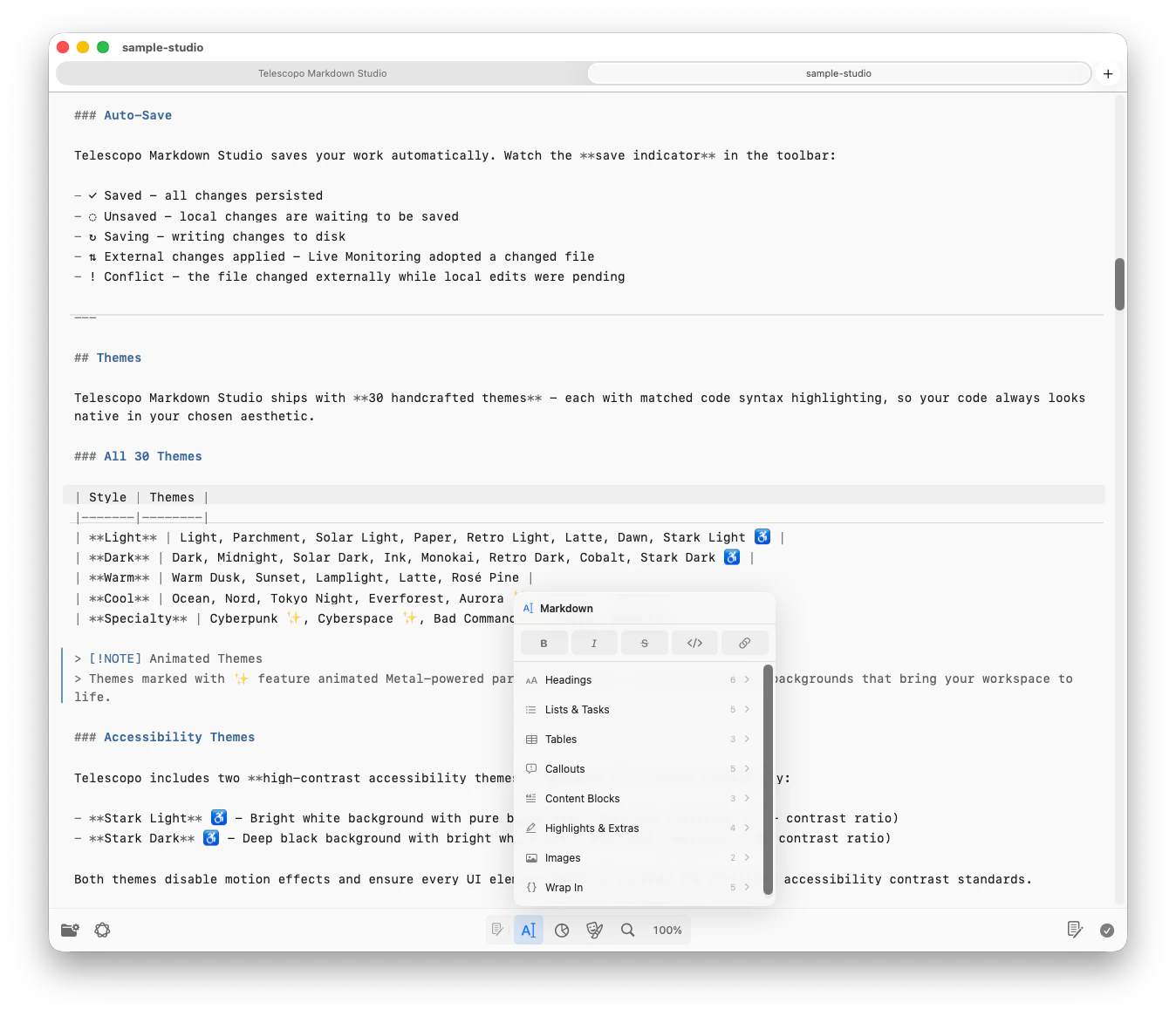
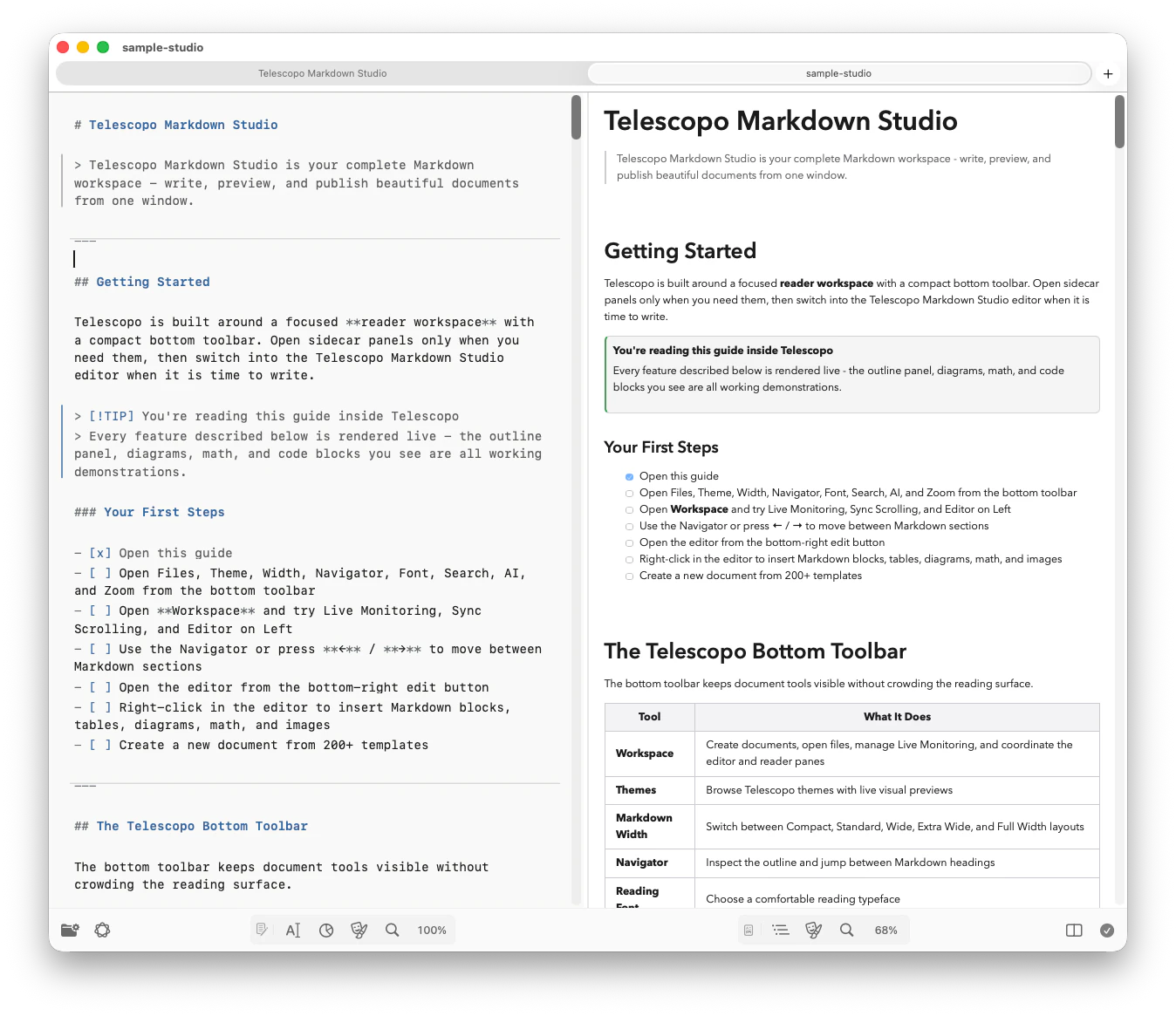
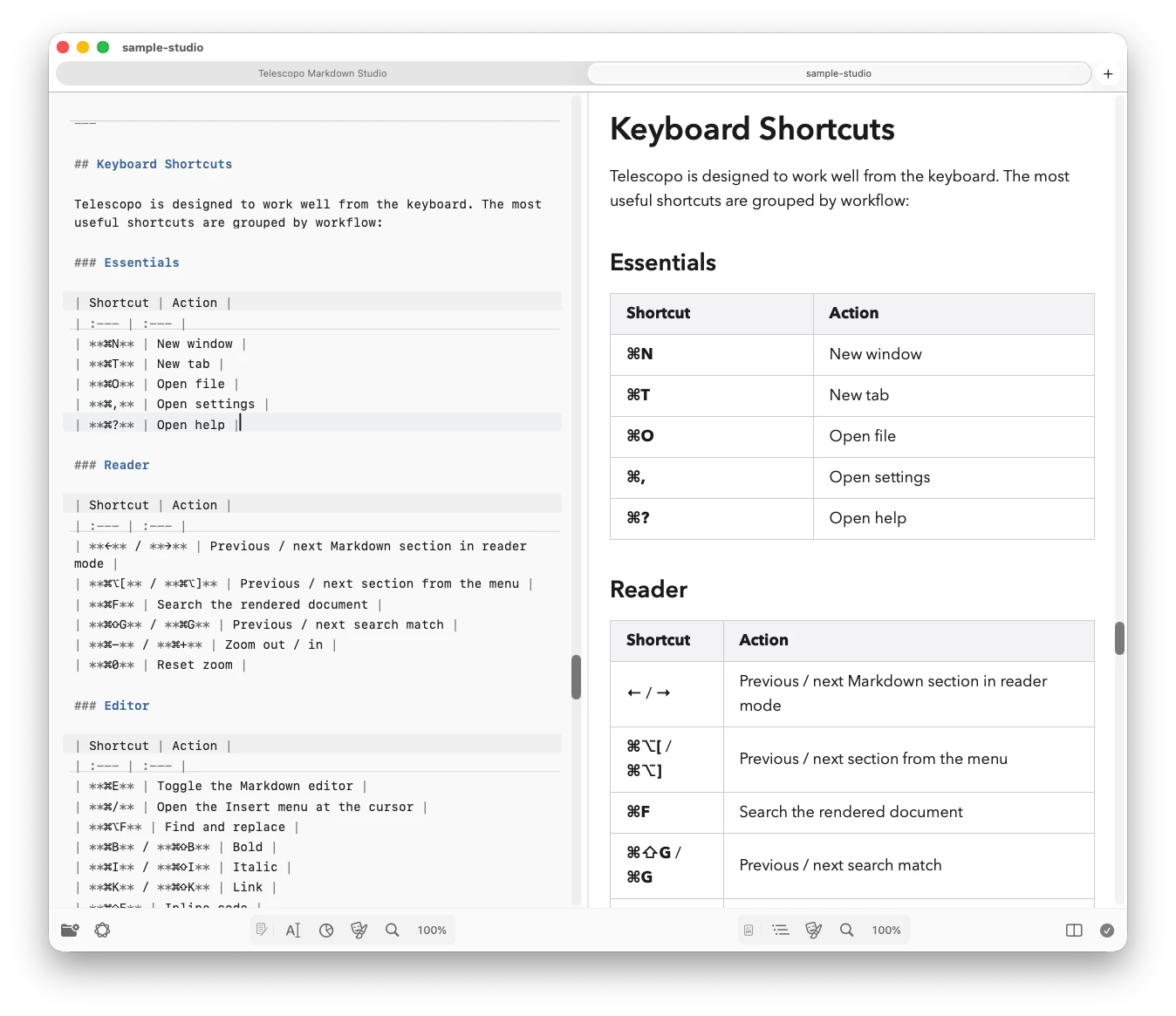
Syntax matters, but the Telescopo Markdown Studio workflow matters just as much. The adaptive command bar keeps Reader, Editor, and Split views close at hand so you can move between focused reading and side-by-side authoring without leaving the document.
| Telescopo tool | Authoring use |
|---|---|
| Split editor | Write Markdown source on one side while the rendered preview updates immediately. |
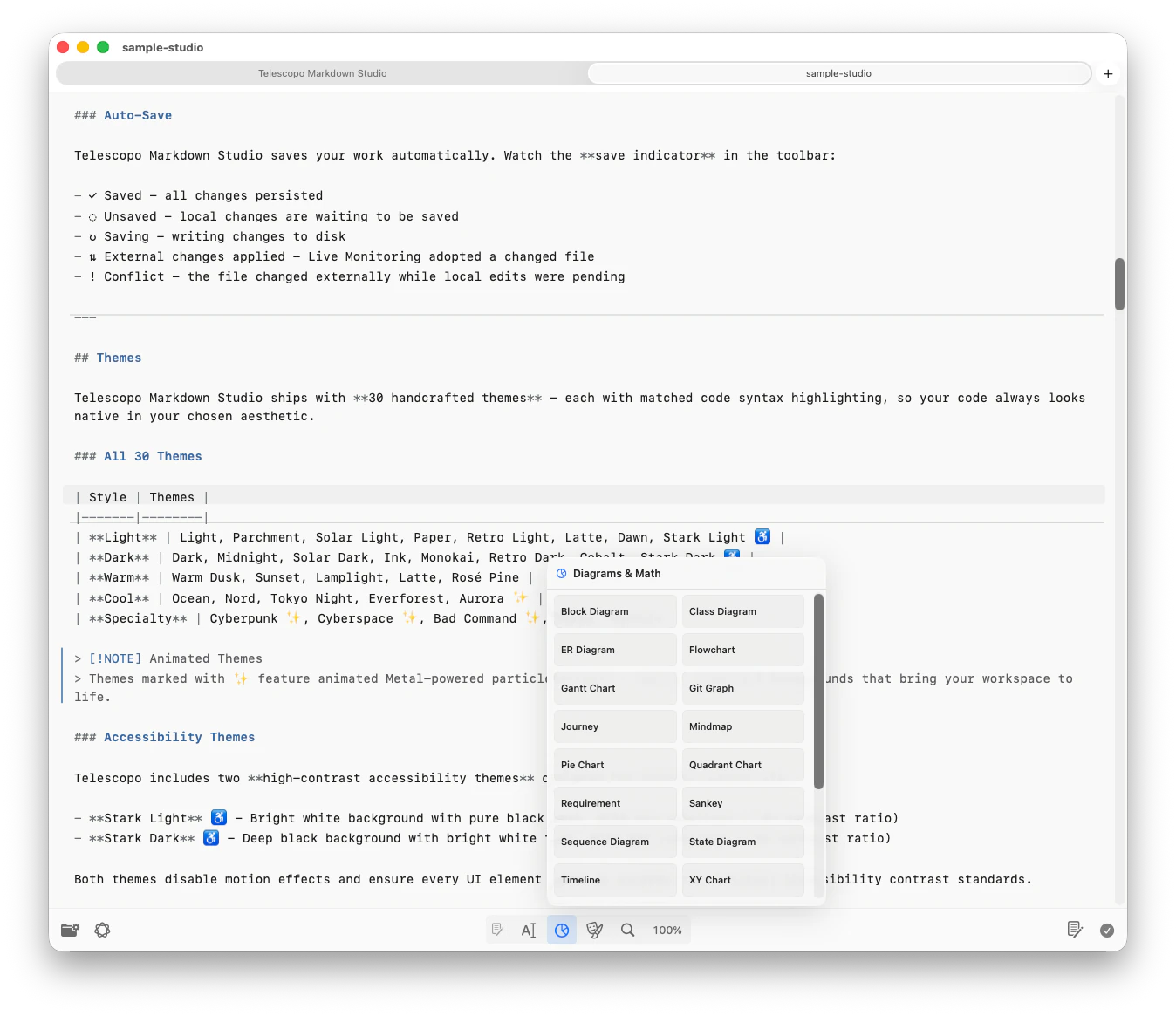
| Insert menu | Right-click or press Command + / to insert headings, lists, tables, callouts, images, Mermaid diagrams, and LaTeX templates. |
| Live Monitoring | Keep a Markdown file open while AI coding tools, scripts, or other editors update it in the background. |
| Navigator | Use the outline, scroll-spy, and left/right arrow keys to move between sections in long documents. |
| Reading controls | Adjust width, zoom, themes, and fonts so long writing sessions stay comfortable on any Mac display. |
Tip: For AI-assisted workflows, keep your plan, changelog, or architecture note open in Telescopo. Live Monitoring tracks local file changes while Navigator keeps your current section easy to return to. See the complete AI-generated Markdown workflow for review and delivery practices.
Markdown Structure and Rhythm
Use a predictable rhythm throughout your document. A strong pattern is: heading, followed by a one-sentence summary, followed by a bullet list or example. This pattern makes documents scannable for both humans and automated systems.
## Why This Exists
One sentence that states the purpose.

## How It Works
- Input
- Processing
- Output

## Example
```json
{ "input": "X", "output": "Y" }
```
Why This Exists
One sentence that states the purpose.
How It Works
- Input
- Processing
- Output
Example
{ "input": "X", "output": "Y" }Headings and Anchors
Use headings as navigation nodes. Make them short and specific so that anchor links are meaningful when extracted by search engines, LLMs, or table-of-contents generators.
# API Design Notes

## Constraints
Keep latency under 200ms for all endpoints.

### Rate Limiting
- 100 requests per minute per API key
- Burst cap of 20 concurrent connections

## Data Model

- [Constraints](#constraints)
- [Rate Limiting](#rate-limiting)
- [Data Model](#data-model)Constraints
Keep latency under 200ms for all endpoints.
Rate Limiting
- 100 requests per minute per API key
- Burst cap of 20 concurrent connections
Data Model
Avoid vague headings: "More info", "Misc", "Notes 2". They are poor anchor targets and provide no value to automated indexers.
Related: Telescopo Navigator for Large Markdown Files. Your heading hierarchy directly powers Telescopo Navigator.
Lists and Tables
Use lists for decisions and actions
Lists work best for sequences, decisions, and action items where order or grouping matters.
### Decision
- Keep markdown parser default behavior
- Override only image, code, heading renderers
- Add DOM tests for regression safety
Decision
- Keep markdown parser default behavior
- Override only image, code, heading renderers
- Add DOM tests for regression safety
Use tables for comparisons
Tables are ideal for side-by-side comparisons where multiple attributes need to be evaluated together.
| Option | Best For | Cost |
| --- | --- | --- |
| Minimal | Fast docs | Low |
| Structured | Team docs | Medium |
| Rigorous | Long-lived specs | High || Option | Best For | Cost |
|---|---|---|
| Minimal | Fast docs | Low |
| Structured | Team docs | Medium |
| Rigorous | Long-lived specs | High |
Links and Images
Write descriptive link text so that links are self-explanatory when extracted from context. Avoid generic "click here" phrasing. Use images to clarify, not to decorate.
Good: [View Architecture Overview](#architecture-overview)
Weak: [Click here](#architecture-overview)
Code Blocks
Always specify the language identifier after the opening triple backticks. This enables syntax highlighting in Telescopo (which supports 70+ languages) and helps LLMs correctly interpret code context.
```swift
func purchaseMarkdownStudio() async throws {
    let result = try await product.purchase()
    // Handle verified transaction...
}
```

```json
{
  "feature": "markdown_studio",
  "enabled": true
}
```
func purchaseMarkdownStudio() async throws {
let result = try await product.purchase()
// Handle verified transaction...
}{
"feature": "markdown_studio",
"enabled": true
}Footnotes, Highlights & Auto TOC
Telescopo extends standard Markdown with three additional features: footnotes for citations, highlight syntax for marking key passages, and an auto-generated table of contents.
Footnotes
Add footnote references inline with [^label] and define them
anywhere in the document. Telescopo Markdown Studio renders them as numbered superscripts with a linked footnote
section at the bottom.
Markdown supports rich formatting[^1] and is widely adopted[^github].

[^1]: Including tables, task lists, and fenced code blocks.
[^github]: GitHub processes over 2 billion Markdown files.
Markdown supports rich formatting1 and is widely adopted2.
- Including tables, task lists, and fenced code blocks.
- GitHub processes over 2 billion Markdown files.
Highlight / Mark
Wrap text in double equals signs to highlight it.
Telescopo Markdown Studio renders this as a <mark> element with a
warm yellow background - ideal for calling out key terms in notes or study material.
The key insight is that ==latency matters more than throughput== for user-facing APIs.

Make sure to ==read the constraints section== before implementation.
The key insight is that latency matters more than throughput for user-facing APIs.
Make sure to read the constraints section before implementation.
Auto-Generated Table of Contents
Place [[toc]] anywhere in your
document and Telescopo will automatically generate a linked table of contents from your headings. It
updates live as you modify the document.
## Table of Contents
[[toc]]

## Introduction
First section content...

## Architecture
Second section content...

### Subsystem A
Nested content...
Table of Contents
Tip: The [[toc]] directive only
generates entries for headings that appear after it in the document. Place it near the
top for a full outline.
Callouts and Alerts
Use GitHub-style callouts when a note needs to stand apart from normal prose. Telescopo supports the common alert types used in technical docs, release notes, runbooks, and study material.
> [!NOTE]
> Neutral context that helps the reader.

> [!TIP] Faster workflow
> Press Command + / in Telescopo to open the Insert menu.

> [!WARNING]
> Review destructive commands before running them.

> [!IMPORTANT]
> This requirement changes the implementation plan.

> [!CAUTION]
> This action may remove local files.
Use callouts sparingly
They work best for warnings, constraints, and details a reader should not miss.
Keep bodies short
If a callout needs multiple sections, it should probably become a normal heading.
Mermaid Diagram Principles
Telescopo Markdown Studio renders Mermaid diagrams locally inside its native Mac workspace without a network dependency. Follow these principles to keep diagrams readable and maintainable.
- One question per diagram ("what flow?", "what states?", "what sequence?").
- Keep labels short and move explanation to surrounding text.
- Prefer several focused diagrams over one giant system map.
Flowchart Example
Use flowchart TD (top-down)
or flowchart LR
(left-right) to show decision trees, process flows, or data pipelines.
```mermaid
flowchart TD
  A[Open File] --> B{File Type}
  B -->|Markdown| C[Render Markdown]
  B -->|Mermaid| D[Render Diagram]
  B -->|LaTeX| E[Render Equations]
  C --> F[Display]
  D --> F
  E --> F
```
flowchart TD
A[Open File] --> B{File Type}
B -->|Markdown| C[Render Markdown]
B -->|Mermaid| D[Render Diagram]
B -->|LaTeX| E[Render Equations]
C --> F[Display]
D --> F
E --> F
Sequence Diagram Example
Use sequence diagrams to show message passing between components, API call flows, or user interaction sequences.
```mermaid
sequenceDiagram
  participant U as User
  participant V as View
  participant R as Renderer
  U->>V: Open document
  V->>R: renderMarkdown(...)
  R-->>V: HTML output
  V-->>U: Display result
```
sequenceDiagram participant U as User participant V as View participant R as Renderer U->>V: Open document V->>R: renderMarkdown(...) R-->>V: HTML output V-->>U: Display result
ZenUML Sequence Diagram Example
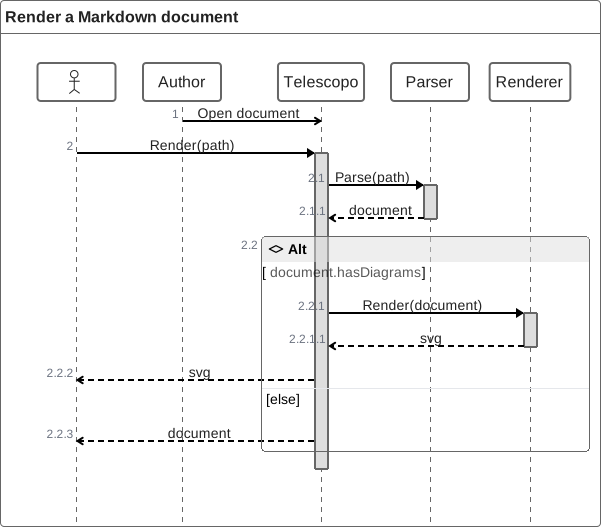
Use a dedicated zenuml
fence when a call-shaped notation reads more naturally than an actor timeline. Nested blocks map
directly to nested interactions, while conditions and returns remain easy to inspect in source.
```zenuml
Author->Telescopo: Open document
Telescopo.Render(path) {
  document = Parser.Parse(path)
  if(document.hasDiagrams) {
    return Renderer.Render(document)
  }
}
```
State Diagram Example
Use state diagrams to model lifecycle transitions, such as application states, connection states, or document processing stages.
```mermaid
stateDiagram-v2
  [*] --> Idle
  Idle --> Rendering: open()
  Rendering --> Ready: success
  Rendering --> Error: failure
  Error --> Idle: retry
```
stateDiagram-v2 [*] --> Idle Idle --> Rendering: open() Rendering --> Ready: success Rendering --> Error: failure Error --> Idle: retry
Gantt Chart Example
Use Gantt charts to show project timelines, sprint plans, or documentation rollout schedules.
```mermaid
gantt
  title Documentation Rollout
  dateFormat YYYY-MM-DD
  section Core
  Draft guide     :done, d1, 2026-02-01, 3d
  QA with fixtures:active, d2, after d1, 4d
  section Publish
  Website deploy  :d3, after d2, 2d
```
gantt title Documentation Rollout dateFormat YYYY-MM-DD section Core Draft guide :done, d1, 2026-02-01, 3d QA with fixtures:active, d2, after d1, 4d section Publish Website deploy :d3, after d2, 2d
Class Diagram Example
Use class diagrams to model object relationships, inheritance hierarchies, and interface contracts.
```mermaid
classDiagram
  class Document {
    +String title
    +String content
    +render() HTML
  }
  class MarkdownDoc {
    +parseMermaid()
    +parseLatex()
  }
  class PDFDoc {
    +export()
  }
  Document <|-- MarkdownDoc
  Document <|-- PDFDoc
```
classDiagram
class Document {
+String title
+String content
+render() HTML
}
class MarkdownDoc {
+parseMermaid()
+parseLatex()
}
class PDFDoc {
+export()
}
Document <|-- MarkdownDoc
Document <|-- PDFDoc
Entity Relationship Diagram Example
Use ER diagrams to model database schemas, data relationships, and cardinality constraints.
```mermaid
erDiagram
  USER ||--o{ DOCUMENT : "creates"
  DOCUMENT ||--|{ SECTION : "contains"
  DOCUMENT }o--o{ TAG : "tagged with"
```
erDiagram
USER ||--o{ DOCUMENT : "creates"
DOCUMENT ||--|{ SECTION : "contains"
DOCUMENT }o--o{ TAG : "tagged with"
Pie Chart Example
Use pie charts to show proportional breakdowns - useful for sprint retrospectives, resource allocation, or survey results.
```mermaid
pie title File Types Opened This Week
  "Markdown" : 45
  "Code" : 30
  "SVG" : 15
  "PDF" : 10
```
pie title File Types Opened This Week "Markdown" : 45 "Code" : 30 "SVG" : 15 "PDF" : 10
Advanced Mermaid Diagram Types
Telescopo Markdown Studio supports more than the usual flowchart and sequence examples. Use specialized Mermaid diagram types when the structure of the content calls for them.
Flow and interaction
Flowcharts, sequence diagrams, state diagrams, user journeys, and timelines describe movement and change.
Software and systems
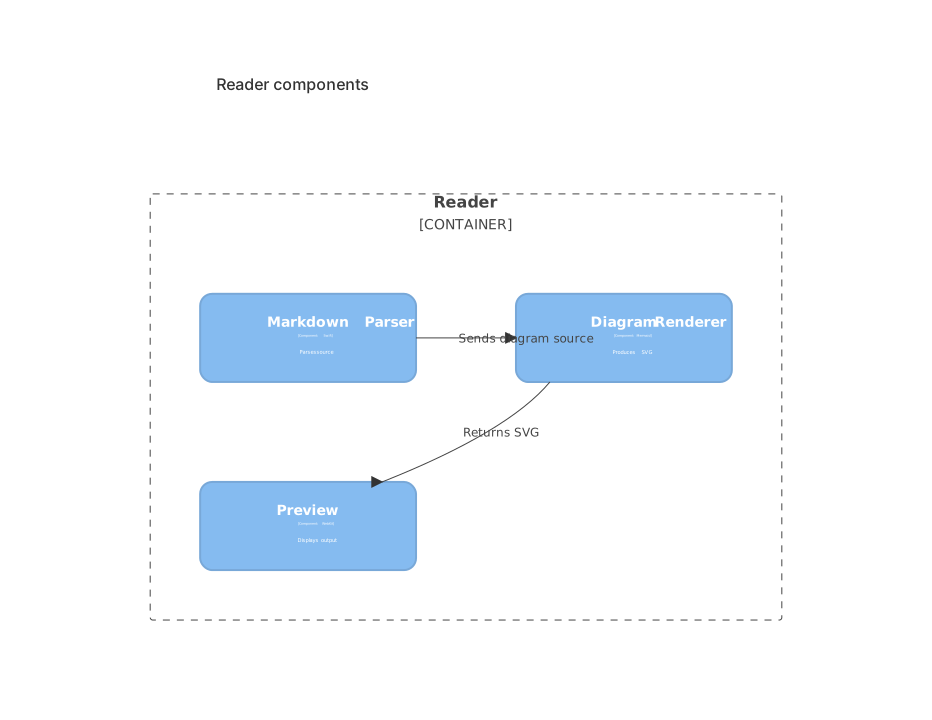
Class, ER, requirement, and Git graphs join all five C4 views: context, container, component, dynamic, and deployment.
Planning and structure
Gantt, Kanban, event modeling, mindmaps, block diagrams, and Ishikawa diagrams organize plans and causes.
Data and specialized formats
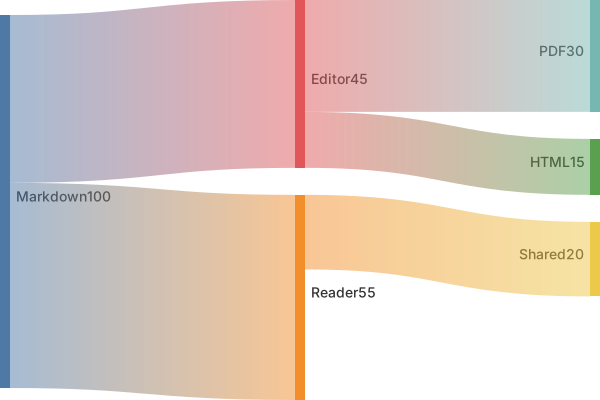
Pie, donut, quadrant, packet, Sankey, treemap, and XY diagrams make proportions, flows, hierarchies, and measurements visible.
```mermaid
quadrantChart
    title Feature Priority
    x-axis Low Effort --> High Effort
    y-axis Low Impact --> High Impact
    quadrant-1 Big bets
    quadrant-2 Quick wins
    quadrant-3 Fill-ins
    quadrant-4 Reconsider
    Templates: [0.35, 0.82]
    Live Monitoring: [0.5, 0.9]
```
Tip: Advanced diagrams can get wide. Pair them with Markdown width controls, and split large diagrams by concern instead of forcing an entire system into one block.
LaTeX Basics: Inline vs Display
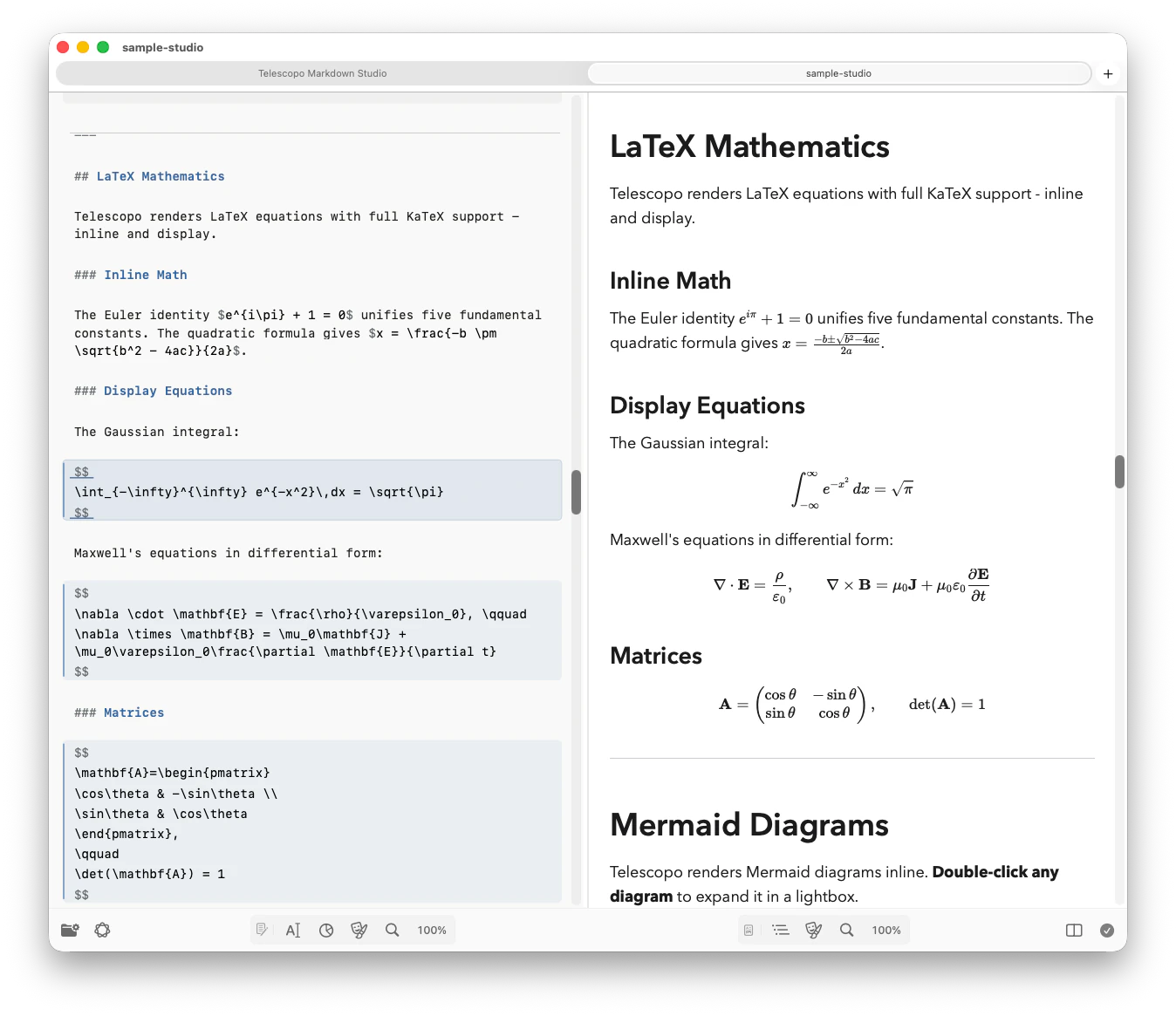
Telescopo Markdown Studio renders LaTeX mathematics using KaTeX. Use single dollar signs for inline math that flows within a sentence, and double dollar signs for display math that stands on its own line.
Inline: The score is $S = \frac{p}{n}$.

Display:
$$
S = \frac{p}{n}
$$
Inline: The score is .
LaTeX and Currency Edge Cases
Financial and product documents often use dollar signs for normal prose. Telescopo is designed to avoid treating common currency text as math, but authors can make intent clearer by choosing delimiters carefully.
Plain currency should stay prose
Examples like $12.4M, $1,200, $10-$15, and $AAPL should read as text in financial notes and tables.
Use bracket math for clarity
When prose contains many prices, use \( ... \) or \[ ... \] for real
equations.
Revenue increased from $12.4M to $18.7M in Q4.
The shell prompt showed `$ export API_KEY=...`.
The price range is $10-$15 per seat.

Real inline math: \(a^2 + b^2 = c^2\)

Real display math:
\[
\text{ROI} = \frac{\text{Gain} - \text{Cost}}{\text{Cost}}
\]
Readable Equation Layout
Use aligned blocks for multi-step transformations. The aligned environment lets you
show derivation steps with consistent alignment.
$$
\begin{aligned}
L &= \frac{1}{n}\sum_{i=1}^{n}(y_i - \hat{y}_i)^2 \\
  &= \frac{1}{n}\left[(y_1-\hat{y}_1)^2 + \cdots + (y_n-\hat{y}_n)^2\right]
\end{aligned}
$$
Narrating Math
Always explain symbols in prose at least once before or immediately after an equation. This is critical for accessibility, searchability, and LLM comprehension of mathematical content.
Let $n$ be the number of samples and $p$ be the number of correct predictions.
Then accuracy is $A=\frac{p}{n}$.
Let be the number of samples and be the number of correct predictions. Then accuracy is .
Mixed-Format Document Patterns
The strongest technical documents combine prose, diagrams, and math in a predictable sequence. Two patterns work especially well.
Pattern: Explain → Diagram → Equation → Example
- Explain the system in two sentences.
- Show flow with a Mermaid diagram.
- Show the formal relation with LaTeX.
- Close with a realistic code or input/output example.
Pattern: Spec writing with key labels
Use italic key labels to call out the inputs, outputs, and constraints of a system component.
_input_: Lesson node from graph
_output_: Problem set aligned to constraints
_constraints_: grade band, topic, complexity
Templates, AI Review, and Export
Good authoring starts before the first sentence. Telescopo Markdown Studio includes 200+ starter templates across 12 categories, so common documents begin with useful structure instead of a blank page.
Start from a template
Choose from templates for engineering docs, product work, planning, finance, education, writing, legal, personal notes, and more.
Preview before creating
The template picker shows the rendered Markdown before you create a file, so you can choose the right starting point quickly.
Ask the AI Assistant
On supported Macs, use the local AI Assistant to summarize, question, and improve the current document without sending content to a server.
Export polished PDFs
Telescopo Markdown Studio exports PDFs with Mermaid diagrams, LaTeX math, images, tables, callouts, theme styling, and syntax highlighting preserved.
Mistakes to Avoid
Too much emphasis
If everything is bold, nothing is important.
Huge diagrams
Split by concern. Do not compress an entire architecture into one block.
Unexplained symbols
Math without variable definitions slows readers down and is opaque to automated tools.
No navigation
Long documents without internal anchor links are hard to use and hard to index.
Accessibility and UX
These guidelines improve readability for all users and make your documents more reliably parsed by screen readers, search engines, and LLMs.
- Use descriptive link text instead of "click here" or bare URLs.
- Add image alt text that describes meaning, not only appearance.
-
Keep heading hierarchy logical (
H2 → H3, avoid random jumps). - Keep line length moderate and paragraphs short.
- Use Contrast Light or Contrast Dark when you need high contrast reading, and choose any installed macOS font if an accessible or dyslexic-friendly typeface improves readability.
- Adjust Markdown width for the display you are using. Wide monitors should not force prose into unreadably long lines.
Starter Template (Copy/Paste)
Use this template as a starting point for any new Markdown document in Telescopo. It includes a title, table of contents, Mermaid diagram, LaTeX equation, code example, and edge-case section.
# Document Title

## Summary
One-paragraph overview of the purpose and audience.

## Table of Contents
- [Architecture](#architecture)
- [Core Formula](#core-formula)
- [Implementation](#implementation)
- [Edge Cases](#edge-cases)

## Architecture
```mermaid
flowchart LR
  A[Input] --> B[Process]
  B --> C[Output]
```

## Core Formula
$$
f(x) = ax^2 + bx + c
$$

## Implementation
```swift
func runPipeline() {
    // concise, realistic example
}
```

## Edge Cases
- Missing input
- Invalid schema
- Timeout behavior

## References
- Internal links
- External docs
Frequently Asked Questions
What Markdown features does Telescopo support?
Telescopo supports full CommonMark and GitHub Flavored Markdown including headings, bold, italic, strikethrough, links, images, ordered and unordered lists, task lists, tables, fenced code blocks with syntax highlighting for 70+ languages, blockquotes, horizontal rules, inline HTML, footnotes, highlights, auto-generated tables of contents, definition lists, and GitHub-style callouts.
Can Telescopo render Mermaid diagrams inside Markdown files?
Yes. Telescopo Markdown Studio renders 27
Mermaid diagram types locally inside Markdown files: flowchart, sequence, state, journey,
timeline, class, entity relationship, requirement, Git graph, Gantt, Kanban, event modeling,
mindmap, block, Ishikawa, packet, Sankey, treemap, XY, pie, donut, quadrant, and five C4 views.
Mermaid uses a mermaid fence or Azure DevOps-style Mermaid block. ZenUML sequence
diagrams use a dedicated zenuml fence.
Does Telescopo support LaTeX math rendering?
Yes. Telescopo Markdown Studio renders LaTeX mathematics using KaTeX. Inline math, display math, aligned equations, matrices, fractions, summations, and bracket-delimited math are supported. Telescopo also avoids treating common currency prose as math.
How do I write a well-structured Markdown document for Telescopo?
Start with a single H1 title, then use H2 headings for each major section. Add one-sentence summaries under each heading, use code blocks and diagrams only where they reduce ambiguity, include a table of contents with anchor links for long documents, and keep heading hierarchy logical.
Can I author documents directly in Telescopo Markdown Studio?
Yes. Telescopo Markdown Studio includes a split editor with live preview, a right-click Insert menu, auto-save, 200+ starter templates, Navigator section jumping, Live Monitoring, AI document chat on supported Macs, and PDF export.