Included with Telescopo Markdown Studio: LaTeX math rendering sits inside the Telescopo authoring workflow with split preview, Markdown editing, Mermaid, templates, PDF export, and theme-aware output.
Why LaTeX in Markdown Is a Broken Experience on Most Macs
Academic researchers, data scientists, and engineers frequently write documents that blend prose with mathematical notation. Markdown is the natural choice for the prose, and LaTeX is the standard for the math. The two pair well in theory: you wrap your equation in dollar signs, and the renderer converts it into a beautifully typeset formula.
In practice, many native macOS Markdown viewers ignore LaTeX entirely. The raw source code sits in the document as literal text, rendering dollar signs and backslashes instead of the integral or summation the author intended. To see the rendered output, most researchers resort to a browser-based editor or a web service, both of which introduce latency, connectivity requirements, and privacy exposure.
Telescopo's Local KaTeX Rendering
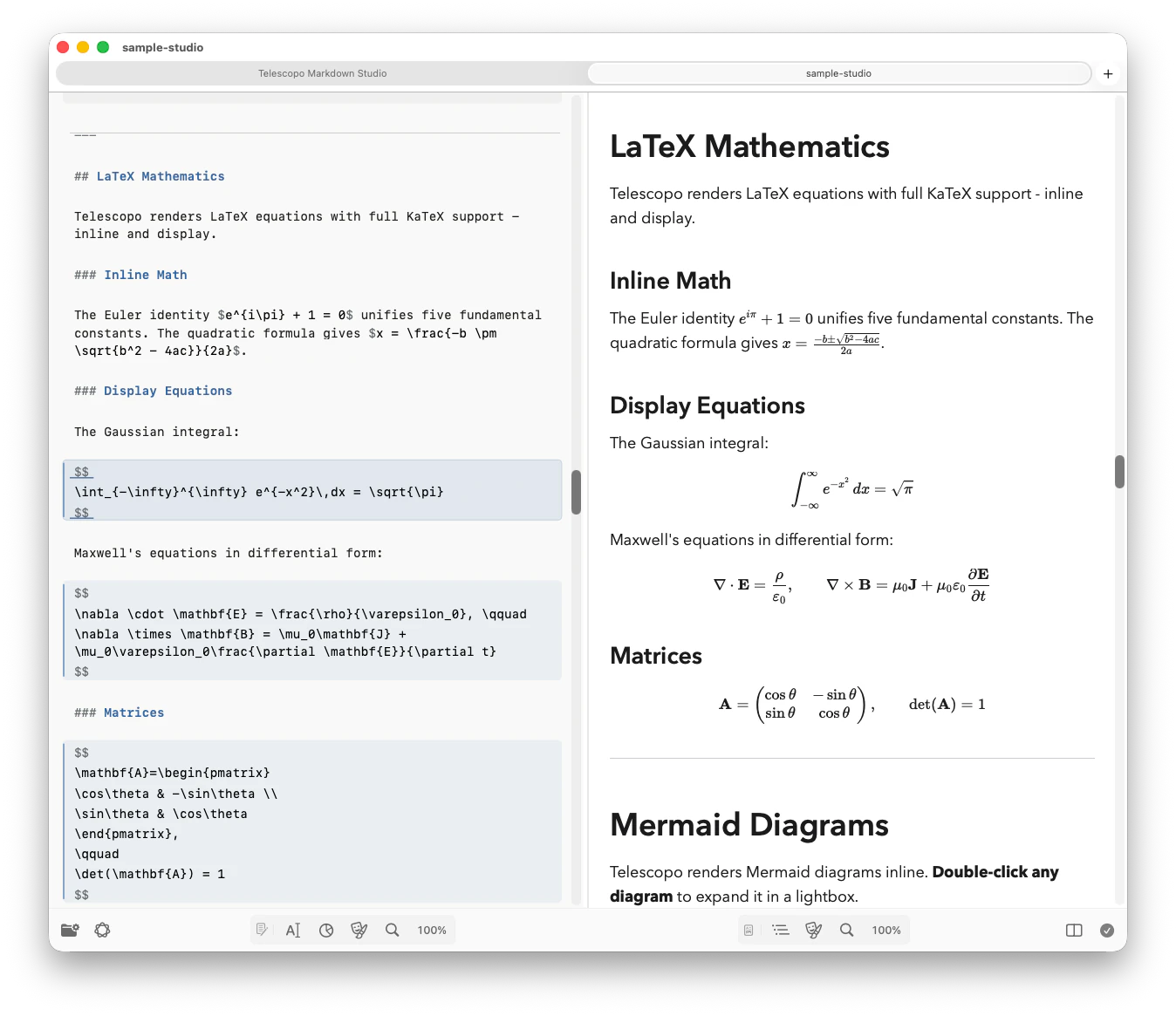
Telescopo bundles KaTeX and its auto-render extension. When a document renders, the engine finds the configured delimiters, parses each supported expression, and produces crisp mathematical typography directly in the document view. It does not require a separate TeX installation or a browser extension.
The entire process happens locally. There are no CDN calls and no network dependency of any kind. The rendering is designed for crisp output on modern Mac displays, including Apple's Liquid Retina XDR panels. KaTeX implements a broad mathematical subset of LaTeX; it is not a complete LaTeX compiler.
Exact Math Delimiters
| Delimiter | Mode | Example |
|---|---|---|
| \(...\) | Inline | \(E = mc^2\) |
| $$...$$ | Display | Centered block mathematics |
| \[...\] | Display | Matrices and multi-line expressions |
Single-dollar delimiters are intentionally not in the
current configuration, so prices such as $19.99 remain ordinary prose. Math inside
pre and
code elements is ignored.
What LaTeX Notation Telescopo Handles
Calculus and Analysis
Integrals, derivatives, limits, partial derivatives, and gradient notation used in machine learning and physics papers.
Linear Algebra
Matrix notation, determinants, vector operations, and eigenvalue expressions essential for data science and graphics programming.
Summations and Series
Sigma notation, product notation, and infinite series representations common in statistics and combinatorics.
Greek and Special Symbols
Full Greek alphabet, set theory symbols, logical operators, and probability notation including conditional expectations.
Fractions and Radicals
Nested fractions, binomial coefficients, square roots, and n-th roots rendered at proper mathematical proportions.
Structured Expressions
Aligned equations, multi-line displays, cases, and supported environments documented by KaTeX.
Better Handling for Financial Documents
Not every dollar sign in Markdown is math. Product specs, invoices, investor notes, and finance docs often include normal prices such as $19.99 or $2,400. Telescopo Markdown Studio is tuned to avoid treating common currency prose as LaTeX, while still rendering intentional math expressions cleanly.
Real-World Use Cases
Research Notes and Paper Drafts
Academics increasingly draft papers in Markdown before moving them to LaTeX or a journal submission system. Telescopo lets you review your equations as they will appear typeset, directly in the same environment where you read the surrounding prose. There is no need to compile a full LaTeX project just to verify that a formula renders correctly.
Machine Learning Experiment Logs
Data scientists often annotate experiment results with the loss functions, regularization terms, and evaluation metrics used in the run. When those annotations are written in LaTeX inside a Markdown log file, Telescopo Markdown Studio renders them legibly, making the log genuinely informative rather than a wall of escape characters.
Educational Content and Lecture Notes
Instructors who distribute lecture notes as Markdown files can use Telescopo to preview exactly what students will see. Inline equations stay inline with the text. Display equations appear centered and at full size. The reading experience is clean and distraction-free, which matters when studying complex material.
Privacy for Proprietary Research
Pre-publication research, proprietary algorithms, and confidential statistical models should not be pasted into a web service merely to render. Telescopo processes the math locally and does not upload equations, document contents, filenames, or paths to a rendering service or product analytics.
Exporting LaTeX-Containing Markdown to PDF
When you are ready to share a document containing LaTeX math, Telescopo Markdown Studio exports it to PDF with all equations typeset at full quality. The export respects your chosen visual theme, so dark-mode documents remain dark in the PDF, and the mathematical typography is preserved without any lossy rasterization.
Related: Exporting Complex Markdown with Mermaid and LaTeX to Landscape PDF. Theme-aware export with landscape orientation for wide equations.
Frequently Asked Questions
Does Telescopo support inline LaTeX in Markdown on Mac?
Yes. Telescopo Markdown Studio renders inline LaTeX, display LaTeX, matrices, fractions, aligned equations, and common math notation inside Markdown files using local rendering. No internet connection is needed.
Is an internet connection required to render LaTeX math in Telescopo?
No. All LaTeX rendering is handled locally on your Mac. There are no CDN calls and no data leaves the device.
What LaTeX commands does Telescopo support?
Telescopo supports standard LaTeX mathematical notation including fractions, integrals, summations, matrices, Greek letters, aligned equations, and other commands covered by KaTeX. The official KaTeX support table is the precise upstream compatibility reference.